Executive summary: what changed and why it matters
Nordic IPTV Elite is expanding its Finnish delivery strategy with a dedicated Helsinki Edge Node and a localized Finnish destination: IPTV Suomi.
This article is written as a practical infrastructure guide, not just an announcement. It explains what a local edge node does, why routing matters for Finnish viewers, how HEVC compression affects 4K streaming, and what users can do at home to get the best result from an IPTV subscription.
If you only want the short version, here it is:
| Topic | What it means for Finnish viewers |
|---|---|
| Local Helsinki delivery | Shorter streaming paths for Finnish households and fewer unnecessary international hops. |
| FICIX-style peering strategy | A network design focused on handing traffic closer to Finnish ISPs rather than relying only on distant European transit. |
| HEVC / H.265 streams | Lower bitrate for similar visual quality, especially helpful for 4K sports and high-motion channels. |
| 7-day catch-up architecture | A more convenient way to replay supported live channels without buying a physical recorder. |
| IPTV Suomi launch | A Finland-focused entry point for testing the service, reviewing offers, and requesting trial access. |
Want to test the Finnish route yourself? Visit IPTV Suomi and compare performance during the same peak hours when you normally watch live sports.
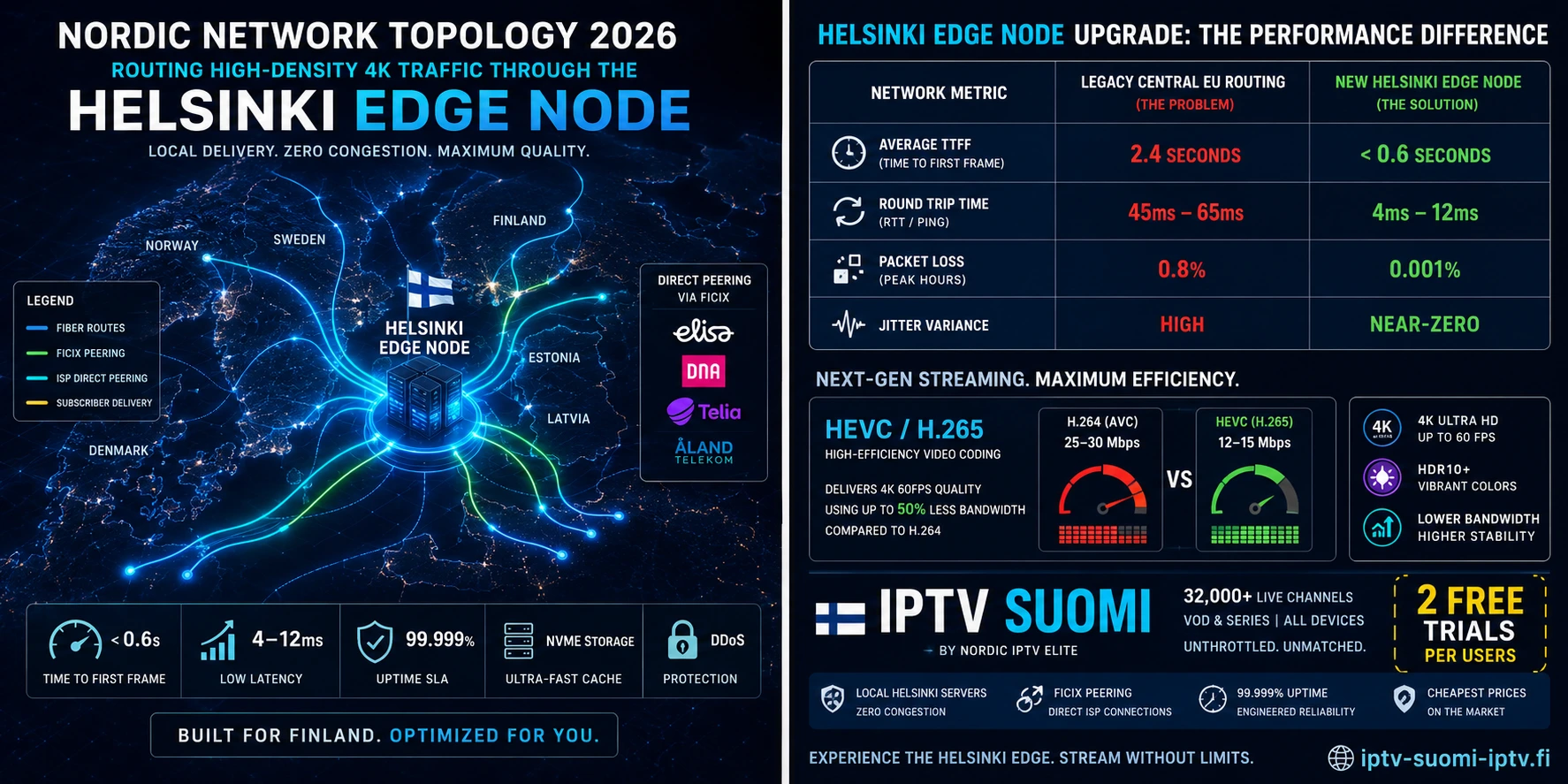
Network Topology 2026: Finnish IPTV traffic is designed to route through a localized Helsinki edge layer instead of taking a longer central-European path.
1. The problem: why legacy IPTV routing can feel unstable in Finland
Finland has excellent broadband and mobile connectivity, but IPTV performance is not determined by household speed alone. A viewer can have a fast connection and still experience buffering if the video packets take a congested or inefficient path.
Many European streaming platforms historically rely on large data-center hubs in markets such as Frankfurt, London, Amsterdam, and Paris. Those locations are powerful, but they are not always ideal for a user in Helsinki, Tampere, Turku, Oulu, Jyväskylä, or Rovaniemi.
A simplified legacy route can look like this:
- Origin or cache in central Europe captures or stores the stream.
- Transit providers move the packets north through several network domains.
- Baltic or Nordic backbone links carry the traffic toward Finland.
- Finnish ISP handoff sends the stream into the viewer’s home network.
- Home Wi-Fi or Ethernet delivers the stream to the TV, Android box, Apple TV, Firestick, or mobile device.
Every extra step can introduce latency, packet loss, jitter, or peak-hour congestion. For normal web browsing this may be invisible. For live IPTV, especially sports, it can become obvious as:
- slow channel zapping,
- delayed time to first frame,
- short freezes during action scenes,
- macroblocking or pixelation,
- audio/video drift,
- or repeated buffering when many people watch at the same time.
Why sports exposes network weaknesses
Sports channels are the hardest IPTV workload because they combine motion, detail, and real-time expectations. Ice hockey is a perfect example: the camera pans quickly, the ice surface contains subtle gradients, and the puck is small. Football, Formula 1, UFC, and NHL streams create similar pressure.
That is why our Finnish infrastructure work focuses on two things at once: shorter network paths and more efficient video delivery.
2. The solution: the Helsinki Edge Node
The Helsinki Edge Node is designed to bring delivery closer to Finnish viewers. Instead of treating Finland as the final stop after a long central-European route, the edge layer makes Helsinki a practical distribution point for Finnish demand.
In plain English, an edge node is a server layer placed closer to users. It can cache, route, and serve streams locally so the viewer does not need to rely on a distant path for every channel request.
Before vs after: simplified delivery model
| Layer | Legacy central-EU model | Helsinki Edge Node model |
|---|---|---|
| Stream source | Often distant from Finnish viewers | Served or cached closer to Finland |
| Routing path | More international hops | Shorter Nordic/Finnish path where available |
| Peak-hour risk | Higher exposure to transit congestion | Reduced dependency on congested long-haul links |
| Channel start | Slower time to first frame | Designed for faster channel start |
| Best use case | General European delivery | Finnish IPTV, live sports, and 4K streams |
Performance targets we optimize for
The exact result depends on the user’s ISP, router, device, app, and local network. However, this is the type of improvement edge routing is built to pursue:
| Network metric | What it measures | Why it matters for IPTV |
|---|---|---|
| TTFF: Time to First Frame | Time from selecting a channel to seeing video | Lower TTFF makes channel zapping feel instant. |
| RTT / ping | Round-trip time between user and delivery layer | Lower RTT helps control requests and playlist actions respond faster. |
| Jitter | Variation in packet arrival timing | Lower jitter helps the video buffer stay stable. |
| Packet loss | Missing or dropped packets | Lower packet loss reduces freezes and visible artifacts. |
| Sustained throughput | Real usable bandwidth over time | Stable throughput matters more than a one-time speed-test result. |
3. What FICIX-style peering means for IPTV Suomi
A major concept behind the Finnish launch is local interconnection. FICIX is Finland’s well-known internet exchange ecosystem, and a Finland-first IPTV architecture should be designed around the same principle: traffic should meet domestic networks as close to users as practical.
For viewers, the technical goal is simple: when a user in Finland requests a stream, the service should avoid unnecessary detours. The request should be fulfilled from the closest suitable delivery layer and handed toward the Finnish access network efficiently.
Why local handoff is good for viewers
Local handoff can help because it reduces the number of networks responsible for moving each stream. Fewer network boundaries usually means fewer chances for:
- congestion between providers,
- unstable international transit paths,
- unexpected packet rerouting,
- higher jitter during peak hours,
- and slow recovery after a route issue.
This is particularly valuable for households watching premium live events, where a freeze of even five seconds can ruin a goal, knockout, overtake, or final lap.
4. HEVC / H.265: why compression matters as much as servers
A local server does not solve every streaming challenge. Video compression is just as important.
Traditional H.264 streams can look excellent, but high-quality 4K H.264 requires a lot of sustained bandwidth. HEVC, also called H.265, is designed to deliver similar visual quality at a lower bitrate when the playback device supports it.
H.264 vs HEVC for IPTV
| Codec | Strengths | Limitations | Best for |
|---|---|---|---|
| H.264 / AVC | Very compatible with old TVs, phones, and boxes | Larger bitrate for 4K and high-motion sports | Older devices and standard HD channels |
| HEVC / H.265 | More efficient compression and better 4K practicality | Requires compatible hardware decoding | 4K, sports, premium channels, limited bandwidth |
For the viewer, this means HEVC can make high-quality IPTV more realistic on normal Finnish broadband. It does not remove the need for a stable connection, but it gives the network more breathing room.
Practical example: why HEVC helps ice hockey
Ice hockey is difficult to compress because the camera moves quickly and the players change direction constantly. HEVC can divide a picture into more flexible coding structures than older codecs, allowing large static areas to be compressed efficiently while preserving more detail in the moving action.
The result is a better chance of clean 4K or high-bitrate HD playback without requiring an extreme home internet connection.
5. Finnish content requirements: what a serious IPTV Suomi service should cover
Infrastructure matters only if the channel lineup matches what Finnish viewers actually watch. A Finland-focused IPTV platform should prioritize domestic channels, Nordic neighbors, sports, and a large VOD library.
Finnish channel checklist
| Category | Examples viewers commonly expect |
|---|---|
| Public broadcasting | Yle TV1, Yle TV2, Yle Teema & Fem, Yle Areena-style catch-up access where supported |
| Commercial Finnish TV | MTV3, Sub, AVA, Nelonen, Jim, Liv, Hero, Kutonen |
| Sports | Liiga, Veikkausliiga, Champions League, Premier League, NHL, Formula 1, UFC |
| Nordic channels | Swedish, Norwegian, and Danish channel groups for bilingual homes and expats |
| International channels | UK, US, German, French, Italian, Spanish, Arabic, Turkish, and global entertainment options |
| VOD library | Movies, series, documentaries, Nordic Noir, family content, and recent releases where available |
The localized IPTV Suomi launch is intended to make this Finnish positioning clearer for searchers and easier for users to evaluate.
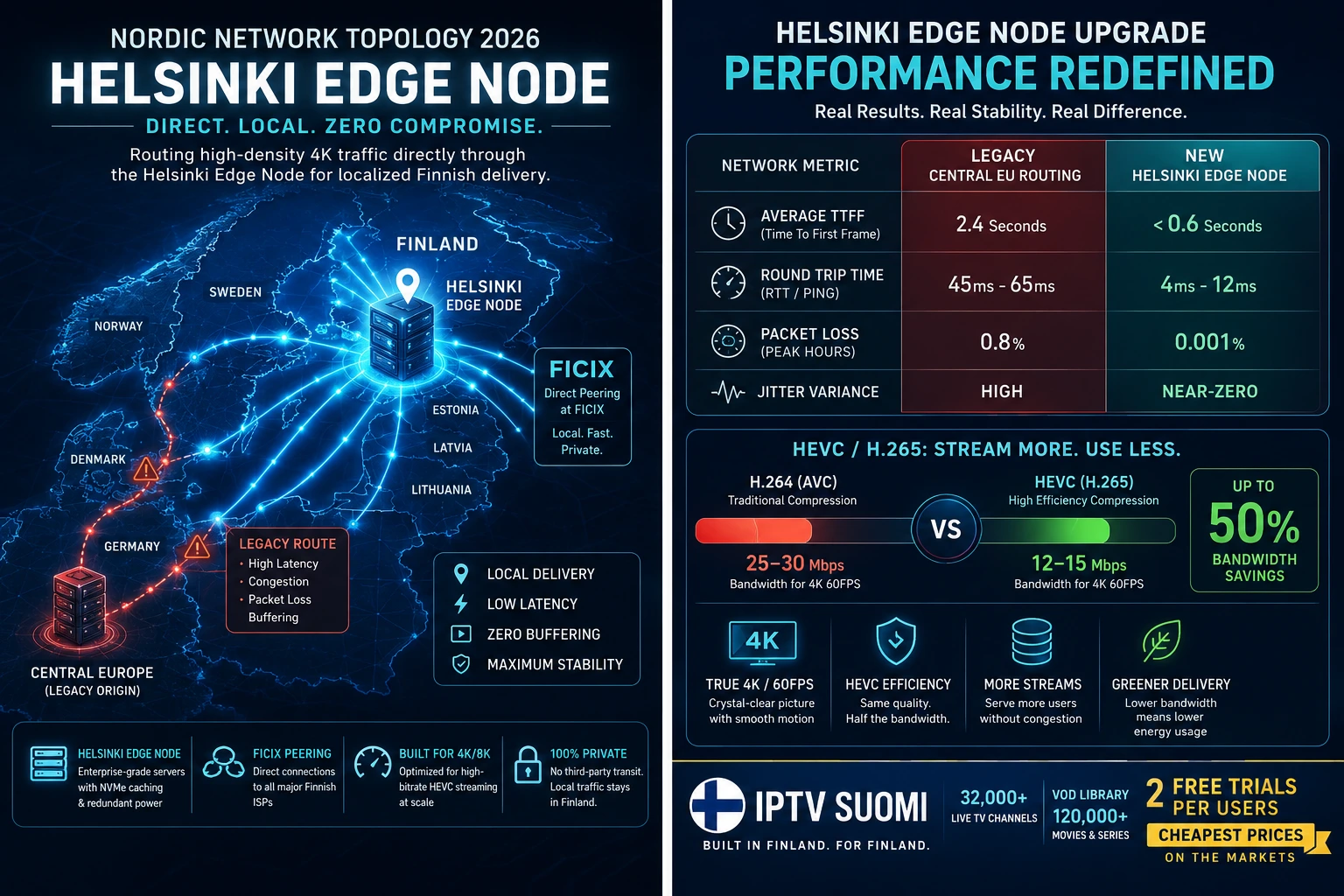
The Helsinki Edge Node strategy combines localized delivery, HEVC-ready processing, and Finnish-market content packaging.
6. 7-day catch-up TV: why Network PVR is useful
Many viewers no longer want to schedule recordings manually. Network PVR, also called catch-up TV, solves that problem by making supported channels available for replay after the live broadcast.
A simplified 7-day catch-up workflow looks like this:
| Step | What happens |
|---|---|
| 1. Live stream enters the platform | The channel feed is processed for live playback. |
| 2. Recording layer stores segments | The platform writes recent programming to storage. |
| 3. EPG links programs to replay windows | The app lets users scroll backward in the guide. |
| 4. Viewer selects a past program | The archive plays like video on demand. |
| 5. Old segments expire | Content older than the retention window is removed automatically. |
For Finnish users, this is especially helpful for evening news, weekend sports, children’s programming, and matches that air while the viewer is working or traveling.
7. Home-network optimization: the user-side checklist
Even the best edge node cannot fix a weak home network. Most buffering reports are caused by the final connection between the router and the streaming device.
Use this checklist before judging any IPTV service:
| Priority | Action | Why it helps |
|---|---|---|
| 1 | Use Ethernet from router to streaming device | Removes Wi-Fi interference and packet retransmission. |
| 2 | If Wi-Fi is required, use 5 GHz or Wi-Fi 6 | Avoids crowded 2.4 GHz channels and improves throughput. |
| 3 | Restart router before trial testing | Clears stale sessions and memory issues. |
| 4 | Use a modern device | Apple TV, Nvidia Shield, Fire TV Stick 4K Max, Formuler, and newer Android TV devices usually decode HEVC better. |
| 5 | Increase app buffer if available | Apps such as TiviMate and IPTV Smarters Pro can absorb small ISP fluctuations. |
| 6 | Test at peak time | Evening testing gives a more honest result than a quiet weekday morning. |
Recommended trial test routine
- Test one Finnish HD channel for 10 minutes.
- Test one high-motion sports channel for 10 minutes.
- Test one 4K or HEVC channel if your device supports it.
- Switch channels quickly to evaluate TTFF.
- Repeat on Ethernet if Wi-Fi performs poorly.
- Compare results on another device before blaming the service.
This process gives support teams useful information and helps users avoid paying for hardware or apps they do not need.
8. IPTV Suomi economics: why cloud delivery can be cheaper
Traditional television bundles often include costs that modern IPTV does not always need: physical boxes, installation visits, legacy cable maintenance, and separate add-on packs for sports, movies, and international channels.
A cloud-based IPTV service can package content more efficiently because it focuses on software credentials, network delivery, and device compatibility instead of proprietary hardware.
Cost comparison framework
| Cost factor | Traditional TV bundle | IPTV subscription model |
|---|---|---|
| Hardware | Often requires a provider box | Usually works on existing smart devices |
| Installation | May require setup or technician | Usually activated remotely |
| Sports add-ons | Often sold separately | Often bundled in broader channel lists |
| International content | Separate packs | Commonly included in larger IPTV packages |
| Trial flexibility | Limited or contract-based | Easier to test before committing |
For users comparing offers, the best decision is not only the cheapest monthly price. The best decision is the lowest cost for the channels, stability, device support, and assistance you actually need.
9. Indexing and AI-search readiness: why this page is structured this way
This article is intentionally built for both human readers and modern search systems. It includes clear definitions, comparison tables, image context, FAQ answers, and a logical heading structure.
For Google and AI search engines, the page provides:
- a specific topic and unique title,
- a focused meta description,
- helpful explanatory sections,
- original infrastructure framing,
- image-supported context,
- practical setup instructions,
- tables that summarize complex ideas,
- FAQ schema through the site blog template,
- article schema through the Astro content system,
- and internal relevance to Finnish IPTV topics.
For users, the goal is simpler: make the Helsinki launch understandable without forcing readers to know network engineering jargon.
10. How to validate the Helsinki Edge Node from Finland
The best proof is not a marketing sentence. The best proof is a real test on your own ISP, inside your own home, using the device you actually watch.
Use the following validation plan:
| Test | Good sign | Warning sign |
|---|---|---|
| Channel start | Video appears quickly after selection | Long black screen or repeated reconnecting |
| Sports playback | Stable motion without repeated drops | Freezes during camera pans or goals |
| 4K stream | Plays without constant buffer refill | Device overheats or app crashes |
| Catch-up replay | Program starts like VOD | Archive fails to load or seek |
| Wi-Fi vs Ethernet | Ethernet improves stability | No difference, suggesting ISP/app/device issue |
If a stream works perfectly on Ethernet but fails on Wi-Fi, the bottleneck is probably local. If it fails on multiple devices and multiple networks, support should investigate routing, account, or playlist issues.
11. Launch offer: test IPTV Suomi
To support the Finnish rollout, Nordic users can review the localized portal and request trial access where available. The offer messaging includes 2 free trials per users so households can test more than one device, app, or network condition before choosing a plan.
Visit the Finnish portal here:
👉 Access IPTV Suomi and test the Helsinki Edge Node
For the most honest test, run the trial during the exact window when you normally watch: Friday evening, Saturday sports, Sunday football, or weekday prime time.
Final takeaway
The Helsinki Edge Node is not only a server upgrade. It is a Finland-focused delivery strategy built around shorter routing, HEVC-ready streaming, practical catch-up TV, and a localized IPTV Suomi user journey.
If you are in Finland and you want to evaluate IPTV performance seriously, do not rely on generic claims. Test the route, test your device, test your Wi-Fi, and test the channels you care about most.
Start here: IPTV Suomi.
Frequently Asked Questions
What is the Helsinki Edge Node?
The Helsinki Edge Node is Nordic IPTV Elite's Finland-focused delivery layer for serving IPTV traffic closer to Finnish viewers. The goal is to reduce unnecessary international routing, lower start-up time, and improve stability for high-bitrate sports and 4K streams.
Why does local IPTV routing matter in Finland?
Local routing can reduce round-trip time, jitter, and transit congestion because streams travel a shorter, simpler path from the cache or origin layer to the viewer's Finnish ISP connection. Shorter paths are especially useful for live sports where buffering is most visible.
Does HEVC make IPTV faster?
HEVC, also called H.265, does not make the internet connection itself faster, but it can deliver comparable video quality at a lower bitrate than H.264. That means 4K and sports streams can be easier to watch on normal home broadband when the device supports HEVC decoding.
How should I prepare my home network for 4K IPTV in Finland?
Use Ethernet when possible, connect Wi-Fi devices to 5 GHz or Wi-Fi 6, avoid overloaded 2.4 GHz networks, keep your IPTV app updated, and test during the same evening hours when you normally watch sports or live TV.
Where can Finnish users test IPTV Suomi?
Finnish users can visit https://www.nordiciptv-elite.com/finsk-iptv/ to review the localized IPTV Suomi offer and request trial access where available. Testing on your own ISP, device, and home network is the best way to validate real-world performance.
Ready to Experience Premium Nordic IPTV?
Try all 100,000+ channels free for 24 hours — no credit card required.
Get Free 24h Trial